
For years, enterprise systems have played a familiar role. They record transactions, maintain data, generate reports, and show teams what has already happened. When a purchase order is delayed or inventory runs low, the system holds the information. A person still has to find it, understand it, and act on it.
But what if the system could recognize a developing situation, identify the next action, and alert the right team before the issue affects business performance?
That is where ERP is heading. Customer expectations change quickly, supply chains face constant uncertainty, and financial pressures demand faster responses. The ability to act on information is becoming just as important as the ability to collect it.
FROM RECORDING ACTIVITY TO SUPPORTING DECISIONS
ERP systems connect finance, procurement, inventory, sales, and operations through shared business data. However, connected data alone does not guarantee a timely response.
Consider a manufacturer facing a sudden increase in demand. Its ERP shows that a critical component is running low, several customer orders are due soon, and a supplier delivery is delayed. The information is available, but procurement, production planning, and sales teams must still coordinate to understand the impact and decide what to do.
A more proactive system could identify the shortage, highlight affected production orders, and alert the responsible team with possible actions. Instead of spending time discovering the problem, employees can focus on evaluating options and making informed decisions. The shift is from simply recording business activity to helping organizations respond to it.
WHAT DOES AN ERP THAT STOPS WAITING FOR INSTRUCTIONS ACTUALLY MEAN?
It does not mean that an ERP system makes every decision independently. It means that the system can use business data, predefined rules, automation, and AI capabilities to identify situations that need attention and initiate appropriate actions.
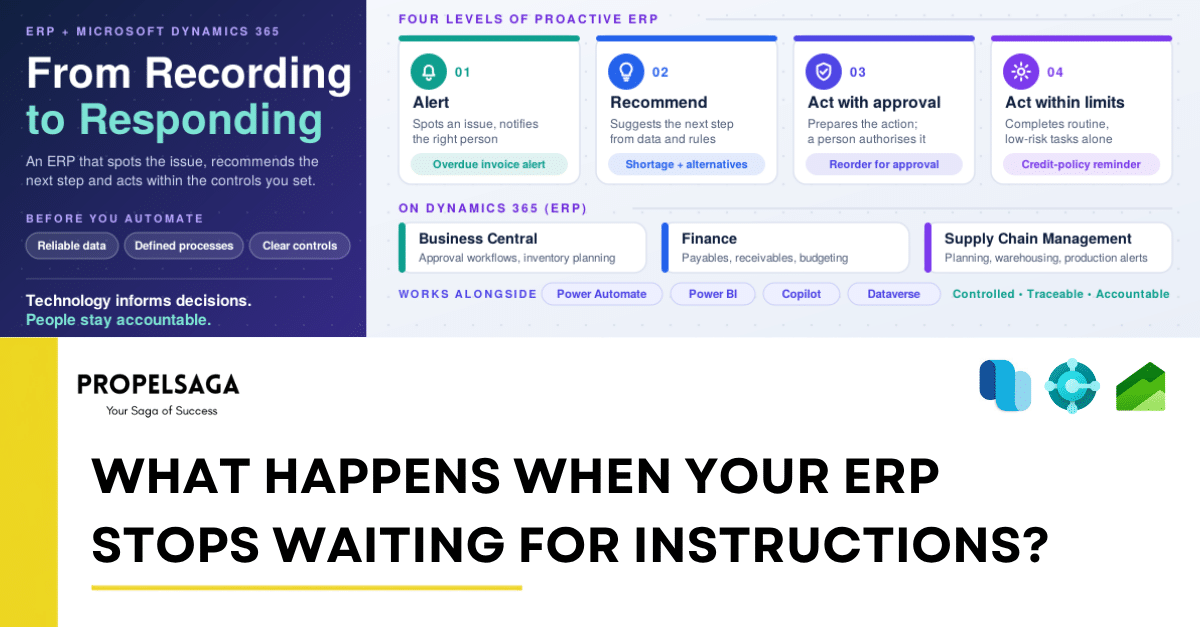
This can happen at different levels:
- Alert: Identify an issue and notify the relevant person.
- Recommend: Suggest a next step based on available data and business rules.
- Act with approval: Prepare or initiate an action that requires human authorization.
- Act autonomously: Complete routine, low-risk tasks within predefined limits.
For example, an overdue customer payment could trigger an automatic reminder under the company’s credit policy, while accounts requiring further review are flagged for the finance team. Similarly, low inventory could initiate a replenishment request subject to purchasing rules and approval limits.
The objective is not to remove people from decision-making. It is to reduce unnecessary manual intervention while keeping decisions controlled, traceable, and accountable.
WHERE CAN THIS MAKE THE BIGGEST DIFFERENCE?
- Finance: Instead of relying only on periodic reviews, finance teams can receive timely alerts about overdue receivables, unusual transactions, and upcoming payment obligations. This helps them prioritize financial risks and respond before they affect cash flow.
- Supply chain and manufacturing: Connected data can help identify stock shortages, delayed supplier deliveries, and production constraints. With appropriate planning capabilities and business rules, teams can assess the impact earlier and initiate relevant workflows before disruptions escalate.
- Order management: When an order is at risk of missing its delivery date, the system can alert the relevant teams so they can coordinate with production and logistics before communicating revised expectations to the customer.
- Management: Rather than spending time collecting information from different departments, leaders can focus on exceptions, emerging risks, and decisions that require their attention.
WHAT HAS TO BE IN PLACE FIRST
These benefits depend on reliable data and well-defined processes. Automating inaccurate inventory records or poorly designed approval workflows can create problems faster rather than solve them. Before introducing more automation, businesses need to establish three foundations: reliable data, clearly defined processes, and appropriate controls over which actions can happen automatically.
HOW MICROSOFT DYNAMICS 365 FITS INTO THIS EVOLUTION
Microsoft Dynamics 365 provides a foundation for organizations looking to connect business processes, improve visibility, and introduce more proactive ways of working. Its capabilities vary by application, configuration, licensing, and integration.
Microsoft D365 Business Central: Improving everyday operations
For small and mid-sized businesses, Microsoft D365 Business Central connects finance, purchasing, sales, and inventory processes. Approval workflows can be configured around purchasing documents, inventory planning can flag what needs reordering, and supported Copilot capabilities can help reduce manual effort and make relevant information easier to access.
Microsoft D365 Finance: Strengthening financial visibility and control
For larger organizations, Microsoft D365 Finance supports general ledger, accounts payable, accounts receivable, budgeting, and financial reporting. Approval workflows on payables, automation of recurring activities, and financial insights help teams manage routine work and identify transactions or financial trends that require investigation.
Microsoft D365 Supply Chain Management: Connecting planning with execution
For organizations managing complex manufacturing, warehousing, and procurement operations, Microsoft D365 Supply Chain Management helps connect inventory, production, and planning activities. A material shortage can be assessed against planned production and demand, with notifications bringing the issue to the relevant team. Its planning capabilities can also help teams assess alternative scenarios.
These applications can also work alongside the Power Platform, including Power Automate and Power BI, and applicable Microsoft Copilot and AI capabilities to extend workflows, improve reporting, and connect information across business processes.
The key is to select capabilities based on the business problem rather than introduce technology simply because it is available. Not every process needs AI; in many cases, well-designed automation delivers meaningful value on its own.
WHAT SHOULD BUSINESSES DO BEFORE MAKING ERP MORE PROACTIVE?
The starting point is not to automate everything. It is to identify where the business loses time waiting for information, approvals, or action.
- Identify recurring delays in work that depends on people checking data, chasing approvals, or sending reminders.
- Prioritize processes where faster responses would create measurable value.
- Define clear rules for what can be automated, what needs approval, and what stays under human control.
- Start with one focused use case, test the approach, measure the results, and expand gradually.
Useful measures include approval turnaround time, overdue receivables, inventory shortages, manual processing effort, and order fulfilment performance.
THE REAL VALUE OF ERP IS WHAT HAPPENS NEXT
The future of ERP is not about removing people from decisions. It is about helping them identify important changes earlier, understand their implications, and act at the right time.
Business leaders will continue to set priorities, functional experts will define the rules, and employees will apply judgement when situations fall outside standard processes. Technology can make these decisions better informed and everyday operations more responsive.
For organizations evaluating their ERP strategy, the important question is no longer just whether the system can record and report business activity.
An ERP creates its greatest value not when it tells a business what happened, but when it helps the business decide what to do next.
HOW PROPELSAGA CAN HELP
Customers are starting to ask for ERP that does more than record business activity. Delivering that takes business process understanding, Microsoft Dynamics 365 expertise, and implementation experience. At PropelSaga, we support Microsoft Dynamics partners across Microsoft D365 Business Central, Microsoft D365 Finance, Microsoft D365 Supply Chain Management, and Power Platform. Through our Partner Acceleration Hub, partners get end-to-end project delivery and dedicated technical and functional expertise aligned with their requirements, whether the work is process improvement, workflow automation, system integration, reporting, or suitable AI capabilities.