
How Microsoft Power Automate and Business Process Improvement Work Together
Automation has become an important part of digital transformation. Businesses want to reduce manual work, improve productivity, minimize errors, and help employees focus on higher-value activities.
With Microsoft Power Automate, organizations can automate repetitive tasks, connect applications, trigger notifications, and streamline approval workflows with minimal coding.
However, there is an important question business should ask before building an automated workflow:
Are we improving the process, or simply making an inefficient process run faster?
The real value of automation comes not just from eliminating manual tasks, but from identifying and improving the right business processes first.
The Problem
with Automating Existing Processes
Consider a company where purchase requests pass through several departments before approval. Employees exchange emails, follow up with managers, update spreadsheets, and manually record approved requests in the ERP system.
The company decides to automate the workflow using Power Automate. Notifications are sent automatically, approvals are routed digitally, and updates are triggered between applications.
The workflow becomes faster, but the underlying problems may remain.
Are all approval levels necessary? Are employees entering the same information multiple times? Are requests being delayed because responsibilities are unclear? Could certain requests be approved automatically based on predefined rules?
If these questions are not addressed, automation may simply reproduce the existing inefficiencies in a digital format.
A better process should come before a better workflow.
How Microsoft Power Automate Enables Smarter Processes
Microsoft Power Automate helps organizations connect systems and automate repetitive activities across their business applications. It can work alongside Microsoft 365, Dynamics 365, SharePoint, and other supported services to create connected workflows.
When combined with business process improvement, it can deliver value in several areas.
1. Eliminate Unnecessary Steps
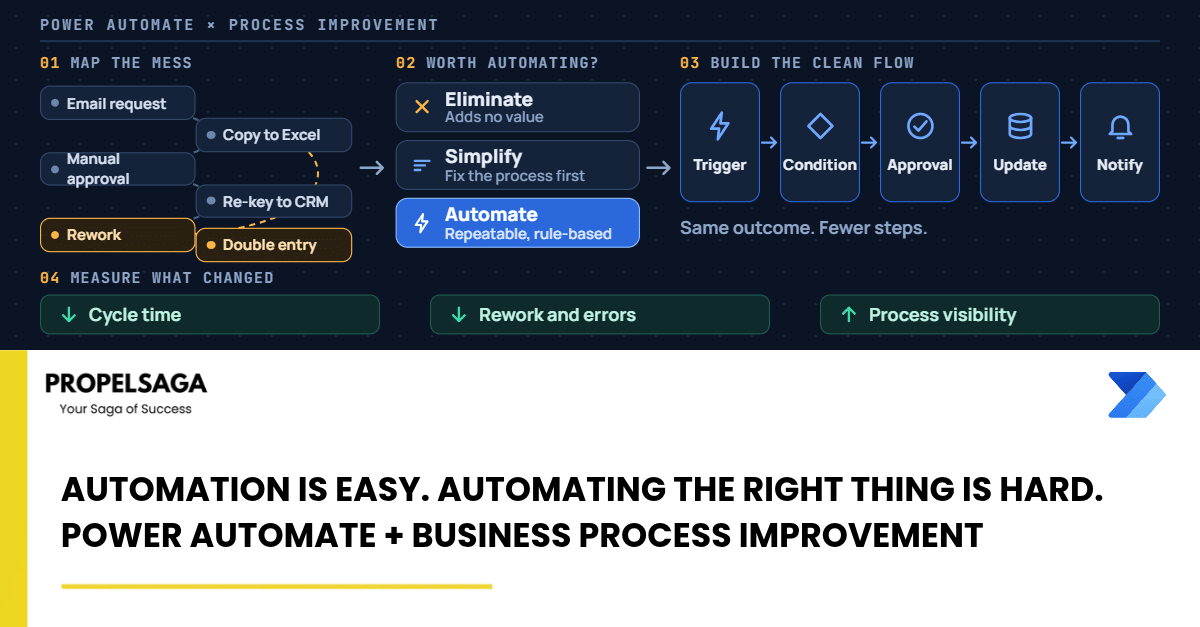
Before automating a process, map how it currently works. Identify duplicate data entry, unnecessary approvals, repeated handoffs, and activities that do not contribute to the final outcome.
Simplifying these steps first creates a more efficient process to automate.
2. Standardize Business Rules
Automation works best when the rules governing a process are clear.
For example, an expense approval process might require different approval levels based on the amount, department, or expense category. Defining these rules beforehand helps create consistent workflows and reduces unnecessary manual intervention.
3. Connect Disconnected Applications
Many businesses use multiple applications for finance, sales, operations, and customer management. When these systems operate independently, employees often become the bridge between them.
Power Automate can connect supported applications, transfer information, trigger actions, and notify relevant teams. This reduces manual coordination and helps information move more consistently across the organization.
4. Keep People Involved Where Judgment Matters
Not every business activity should be fully automated. Routine, rule-based tasks are often suitable for automation, while exceptions, sensitive decisions, and complex situations may require human judgment.
A well-designed workflow automates repetitive work while preserving human oversight where it adds value.
Practical Examples of Process Improvement With Power Automate
Businesses can apply this approach across multiple functions:
- Finance: Simplify invoice processing, automate approval routing, and reduce manual follow-ups.
- Sales: Automate lead assignment, customer follow-up reminders, and updates between connected applications.
- Human Resources: Streamline employee onboarding, document collection, and task assignments.
- Procurement: Improve purchase request routing, supplier notifications, and approval tracking.
- Customer Service: Trigger notifications, route requests, and coordinate follow-up activities across connected systems.
In each case, the objective should be to improve the business outcome—not merely to create another automated flow.
A Better Approach to Automation
Organizations can make automation more effective by following a structured approach:
Understand → Improve → Automate → Measure
Understand: Document the current process and identify bottlenecks.
Improve: Remove unnecessary steps, clarify responsibilities, and establish business rules.
Automate: Use Microsoft Power Automate to execute suitable tasks and connect systems.
Measure: Track processing time, error rates, manual effort, and overall business impact. Refine the workflow based on actual results.
This approach helps businesses focus on meaningful outcomes rather than the number of workflows they build. Microsoft also recommends planning automation around business value, designing and testing workflows carefully, and managing them throughout their lifecycle.
Conclusion: Better Automation Starts With Better Thinking
Microsoft Power Automate makes it easier for organizations to automate everyday business activities. But the technology alone cannot determine whether a process is necessary, efficient, or aligned with business objectives.
That responsibility begins with understanding how work should happen.
Businesses that improve their processes before automating them can build workflows that are simpler to maintain, easier to scale, and more valuable to the organization.
At PropelSaga, we help Microsoft Dynamics 365 and Power Platform partners strengthen their delivery capabilities and support business process modernization. From workflow automation to connected business applications, the focus remains on creating practical solutions that deliver meaningful business value.
Because automation is easy. Automating the right thing is what makes the difference.
Learn more at propelsaga.com.
#PropelSaga #MicrosoftPowerAutomate #PowerPlatform #BusinessProcessAutomation
#DigitalTransformation