
Customer support teams face a pretty straightforward problem today: case volume keeps growing, but team size stays the same. The real benchmark for good customer service now comes down to how fast you can solve a problem without making the customer repeat themselves.
Microsoft Dynamics 365 Customer Service uses AI to cut out repetitive admin and handle routine inquiries. Here is a practical breakdown of how it works.
The Problems Service Teams Face
Most service teams deal with these four problems, whatever industry they are in.
- Customer information is scattered. A customer emails, uses chat, and calls three different departments. Representatives waste the first few minutes reading through old notes while the customer repeats their issue.
- Too much of the work is routine. A large share of incoming requests are simple, repetitive questions: order status, password resets, returns, warranty checks. Experienced representatives end up handling basic tasks instead of complex issues.
- Knowledge articles go out of date. Articles are written once and forgotten. As products, policies, and processes change, representatives end up giving different answers to the same question, and customers find outdated information.
- Quality checks cover only a small sample. Managers can only audit a tiny sample of cases. Most interactions go unmonitored, making coaching inconsistent.
These problems are growing rather than shrinking. Gartner predicts that by 2029, agentic AI will resolve 80% of common customer service issues on its own.
The biggest roadblock for most companies isn't the tech itself—it's trust. Nobody wants an unmonitored AI giving wrong answers to customers. Dynamics 365 addresses this by letting you roll out AI in controlled stages.
The 3-Layer AI model in Microsoft Dynamics 365
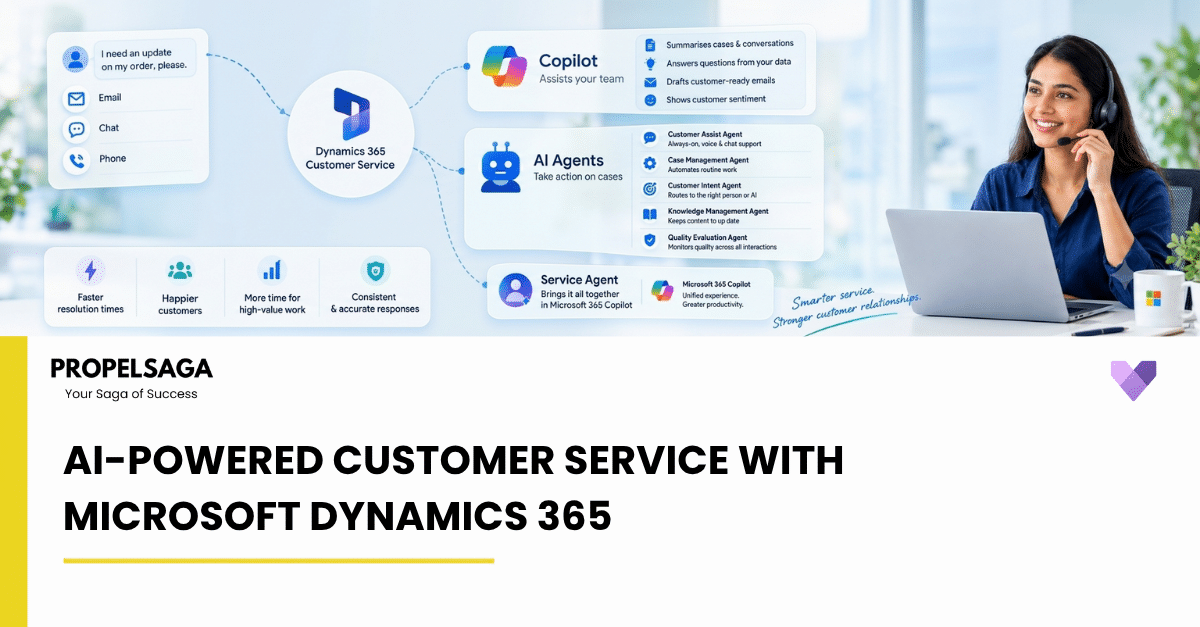
1. Copilot: Help for Service Agents
Copilot acts as an assistant sitting alongside your representatives.
- Case and conversation summaries. Condense long email threads, chat logs, and ticket histories into a few bullet points with one click.
- Ask a question. Representatives can ask questions in plain language and get answers pulled directly from internal knowledge bases and ticket history. You can lock down specific responses so sensitive answers are always quoted word-for-word.
- Draft emails. Copilot suggests email templates and drafts contextual replies for representatives to review, edit, and send.
- Customer sentiment. The case shows the customer’s mood (e.g. frustrated, neutral), so the agent can respond accordingly.
2. AI agents: routine tasks handled automatically
While Copilot assists a human, these specialized agents handle defined tasks on their own within preset boundaries.
- Customer Assist Agent. Handles customer self-service in chat and voice. Its real-time voice AI can hold a natural conversation, handling interruptions, switching languages mid-conversation, and passing full context to a human representative if a handoff is needed.
- Case Management Agent. Automates routine ticket admin. It creates tickets from incoming emails, updates statuses, drafts resolution messages, and routes inbound mail.
- Customer Intent Agent. Analyzes live and past interactions to figure out what the customer is actually trying to do, ensuring tickets get routed correctly the first time.
- Customer Knowledge Management Agent. Scans closed cases, identifies missing documentation, and drafts new help articles to keep internal documentation fresh.
- Quality Evaluation Agent. Automatically scores customer interactions against defined quality standards across 100% of cases.
For IT teams, two additional features are useful: an agent feed that shows what AI agents are doing in real time, and a Model Context Protocol (MCP) server, which lets other AI tools connect to the service environment.
3. Service Agent in Microsoft 365 Copilot
Service Agent brings service work into Microsoft 365 Copilot, Outlook, and Teams. It summarizes cases and customer timelines, searches Dataverse, SharePoint, and Microsoft 365 for answers, drafts customer emails, updates records, and suggests next steps. For example, a sales manager can check a customer's open cases directly from Outlook. Service Agent requires a Customer Service Enterprise or Premium license, and a Microsoft 365 Copilot license for the full experience.
Trust and control
Microsoft includes several ways to test AI before it interacts with real customers:
- Simulation. Test automated workflows in a sandbox environment.
- Shadow mode. Run
- in the background to see what actions they would have taken without executing them.
- Granular controls. Service Agent is set up from the Microsoft 365 admin center, with controls by role and queue that can be reversed. Supervisors also get a dashboard showing AI agent activity in real time.
The overall approach is that AI handles routine work, while humans handle judgement, empathy, and complex cases. Every action an AI agent takes can be audited, and agents hand cases to humans with full context when needed.
PRACTICAL DEPLOYMENT STRATEGY
The best approach is a phased rollout:
- Step 1: Enable Copilot to help representatives speed up handle times and reduce manual admin.
- Step 2: Test AI agents in shadow mode on a single queue.
- Step 3: Enable full automation only for basic, high-volume cases once accuracy is proven.
Because pricing is usage-based (paying for conversations handled and summaries generated), you can start small and scale based on actual results.
THE BOTTOM LINE
AI-powered customer service is not about replacing service teams. It is about removing the work that keeps them from doing their actual job. Routine questions get handled automatically, Copilot takes care of much of the reading and writing, and quality is checked on every interaction instead of a small sample. Customers get faster answers at any hour, without repeating themselves.
The technology for this is not experimental anymore. It is available, it is controlled, and it can be adopted in stages.
HOW PROPELSAGA CAN HELP
AI in customer service does not have to mean changing everything at once. PropelSaga helps organizations identify the right starting point within Microsoft D365 Customer Service and build an AI roadmap around their existing service operations.
From enabling Copilot for service representatives to implementing AI agents for case management, customer intent, knowledge management, and quality evaluation, our team can help you assess, configure, integrate, and scale the right capabilities for your business. We focus on a practical, phased approach, starting with the areas where AI can reduce repetitive work, improve response quality, and give service teams more time to focus on customers.
Looking to bring AI into your Microsoft D365 Customer Service environment? Let's discuss where you can start.